Documentation
Everything DesignLoop does, surface by surface — what each control is, what it costs you, and where the data goes. Every section carries a short silent recording of the thing it describes, so you can see the surface before you install it.
- Version 0.1.0
- Chrome 116+
- On-device AI Chrome 138+
- Updated 22 August 2026
Start here#
DesignLoop is a Chrome extension and a companion Figma plugin. It closes one loop: the live page comes into Figma as real layers, the fix happens in the browser on the real thing, and the fix goes back to code as an issue a developer — or a coding agent — can implement without a meeting.
There is no server, no account and no telemetry. On default settings nothing
leaves your machine: the default model is Chrome's on-device Gemini Nano and
the default transcription mode is none. Everything that does
leave — GitHub, OpenRouter, OpenAI — leaves on a key you supply, to a service
you configured, and only when you take an action that says so.
The four things it does
The shortest useful path: install, open a page you own, click the toolbar icon, hit Element, click something, and type “tighter padding, darker text” into the side panel. That exercise touches the picker, the session, the model and the diff ledger in about forty seconds.
Install & set up#
Two installs — the extension and the Figma plugin — then as much or as little configuration as the features you actually want.
1 · The extension
From the Chrome Web Store, or unpacked from source. Unpacked is the
development path and needs bun:
bun run install:all
bun run build
# chrome://extensions → Developer mode → Load unpacked → extension/dist
Load extension/dist, not extension/. Pin the icon
to the toolbar — activation is a click on it, and there is no content script
running before that click.
2 · The Figma plugin
Published as DesignLoop Import in the Figma Community, or
loaded locally from source, which needs the Figma desktop
app: Plugins → Development → Import plugin from manifest…
and pick figma-plugin/manifest.json.
You only need the plugin for full-fidelity imports. The SVG and PNG copy formats paste into Figma — or anywhere else — with no plugin at all.
3 · Configure only what you need
Nothing below is required to export a page or to edit one with the on-device model. Each row is a feature you switch on by supplying its key.
| To get | You supply | Where it goes |
|---|---|---|
| Filing GitHub issues | A fine-grained PAT + owner/repo |
api.github.com, from the service worker only |
| The Plus / Pro models | An OpenRouter key | openrouter.ai, on your account |
| Whisper-grade transcription | An OpenAI key (or the OpenRouter one) | api.openai.com / openrouter.ai |
| Voice notes at all | One microphone grant | Nowhere — audio is kept locally unless you tick attach |
| Renaming a font family | Nothing | Google Fonts, only when you rename one |
The GitHub token
Scope a fine-grained
PAT to the single repo you want issues in, with two permissions:
Issues: read & write (to create the issue) and
Contents: read & write (to upload screenshots — GitHub's
REST API cannot attach files to an issue, so assets are committed to a
designloop-assets branch and linked). Paste it with the repo in
Settings and hit Test connection.
The microphone
Granted once, on the extension's own origin, from a page the extension opens for exactly that purpose — a background worker cannot raise that prompt itself. After that, voice works on every site with no further prompts.
How it fits together#
Five runtime surfaces, one session, and a hard rule about where secrets are allowed to live. Worth five minutes: most confusing behaviour in the product is a consequence of one of these.
The surfaces
The session
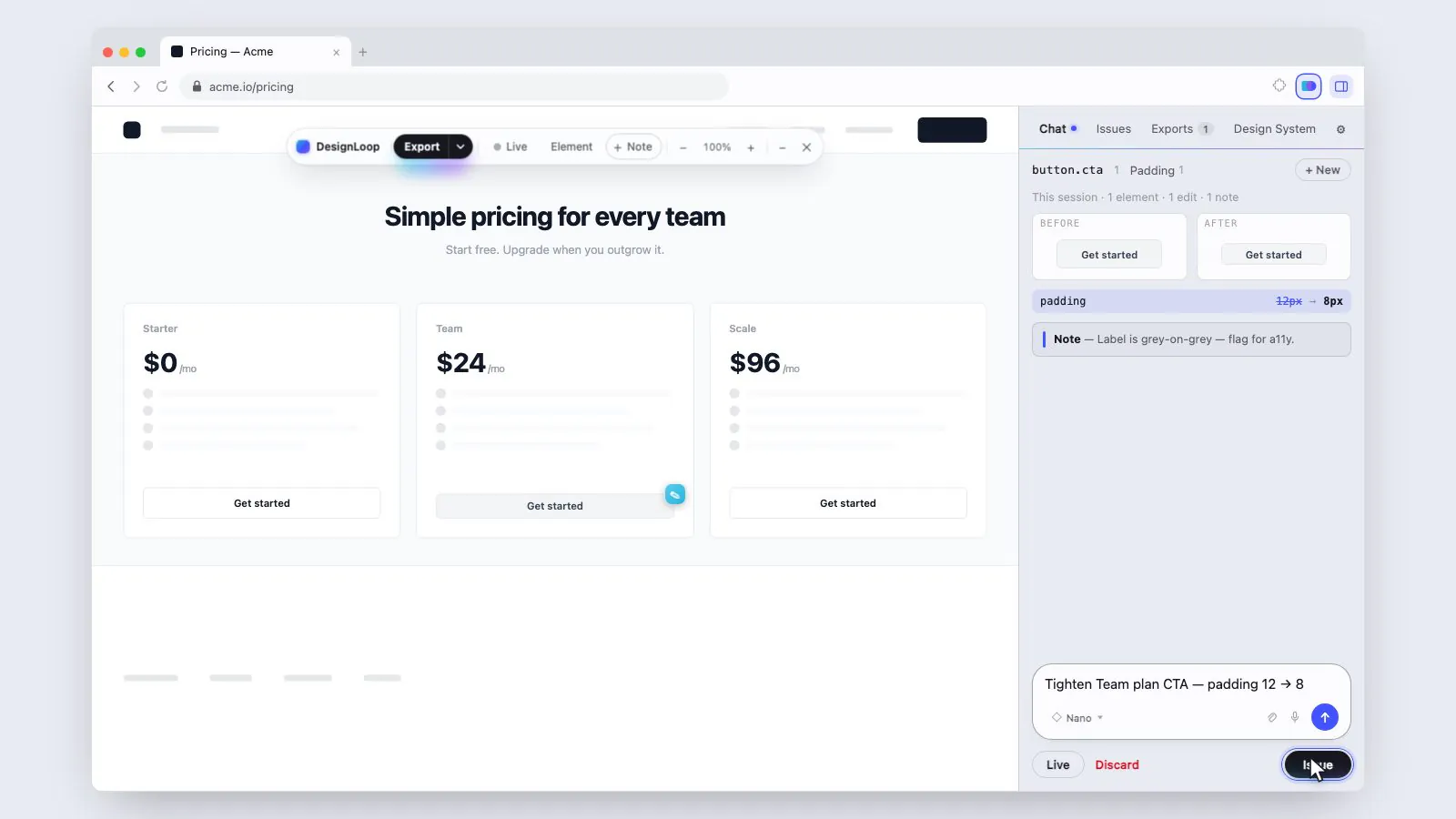
Everything you change on a page belongs to an iterate session: an ordered list of steps, each with the element it touched, the declarations it wrote, a before/after screenshot and a computed-style diff. Chat turns, dock edits, voice utterances and sweeps all land in the same list, which is why ⌘Z walks back a manual padding edit and an AI restyle identically, and why Create issue can describe a change in executable detail rather than in adjectives.
Sessions are keyed by page — origin plus pathname, so a query string or a hash is still the same view — and survive navigation, the worker dying, and the panel being closed. They do not survive a reload of the page itself: the edits are live DOM changes, so a refresh restores the site exactly as its server sent it.
Where things are stored
| What | Where | Lifetime |
|---|---|---|
| Settings, keys, drafts, sessions | chrome.storage.local | Until you delete them or uninstall |
| Screenshots, audio, export payloads | Extension-origin IndexedDB | Garbage-collected once the draft that owns them is pushed or discarded |
| Active model, iterate mode | Their own top-level keys | Atomic — every surface watches them, none of them race |
| Anything at all | chrome.storage.sync | Never. Nothing is synced. |
The token boundary is the one rule with no exceptions. A content script shares a process with the page it runs on. A hostile page that gets code into it still finds no credentials, and everything it sends the worker is schema-validated before the worker acts on it.
The page toolbar#
Clicking the extension icon injects one floating glass bar into the page. It is the only thing DesignLoop puts on a site by default, it is draggable by its mark, and every control on it is a mode you can leave with Esc.

Two other ways in
⌥⇧E arms the export picker and ⌥⇧I arms the issue
picker without touching the toolbar; ⌥ double-click on any element
starts an issue on it directly. Both shortcuts are rebindable at
chrome://extensions/shortcuts.
The inspector dock#
A Figma-style properties panel, drawn on the page itself. It reads the pinned element's computed styles and hands every commit to the session — so a manual edit is a first-class step: live, diffed, undoable, and mirrored into the side panel's ledger alongside the AI's.

What's in it
The field grammar
Fields are invisible at rest — no ground, no border — so the dock reads as a list of values rather than a wall of inputs. Focus takes a violet border and halo. A value commits on Enter or on blur, and that commit is the undoable session step: the field flashes violet, the ledger in the side panel grows a line, and ⌘Z takes it back.
Structural edits
The dock does more than restyle. With an element selected:
| Action | How | Notes |
|---|---|---|
| Resize | ← → ↑ ↓ | 1px a press, 10px with Shift |
| Duplicate | ⌘D | The copy lands immediately after the original |
| Delete | Delete / Backspace | Undoable like any other step |
| Reorder / reparent | Drag a row in the tree | Places the node before the row you drop on |
| Edit copy | Click the text in place | Commits as a text step, diffed like a style one |
| Undo / redo | ⌘Z / ⇧⌘Z | One history across chat, voice and manual edits |

Every change is a live DOM change on your copy of the page. Nothing is written to the site. A reload restores it exactly as the server sent it — which is why the point of the loop is to turn the session into an issue before you leave.
Chat#
The Chat tab is where a change gets described rather than drawn. Type what you want — “tighter padding, darker text” — and the model turns it into concrete declarations that are applied to the real page, screenshotted, and diffed.

Three ways to start
Past sessions are listed under the launcher, grouped by page, freshest first, with a search box over their names and pages. Resuming one restores its thread; it does not re-apply its changes to a page that has since reloaded.
Ask, Auto, Plan
The mode decides how a change is allowed to land, and ⇧⇥ cycles it. It is a single shared setting, so the on-page toolbar and the side panel never disagree about which one is active.

| Mode | What happens | Reach for it when |
|---|---|---|
| Auto default | Applies and keeps every change on the spot. No card, no signature — just the transcript and undo. | You're exploring and want the page to keep up with you. |
| Ask | Applies the change, then waits: each element shows Keep / Revert until you sign off. | Deliberate review, or someone is watching. |
| Plan | Works the change out and touches nothing. The proposal parks on an Apply / Discard card describing exactly what it would do. | The page is precious, or you want to read the intent first. |
Ask leaps and then lets you look. Plan lets you look before it leaps. Apply on a plan keeps the change outright — the plan review was the review.
Slash commands
A / at the head of an empty draft opens the command menu: every
session action that otherwise lives on a button, reachable from the keyboard.
The query matches names and aliases, so /clear and
/start both find /new. The moment you type a space
it's prose again — /clear the deck is a sentence.

| Command | Aliases | What it does |
|---|---|---|
/new | /clear /start | Start a new session, clearing the chat |
/keep | — | New session, keeping the changes on the page |
/live | — | Go hands-free — point and speak |
/undo | — | Undo the last change |
/issue | — | Create a GitHub issue from this session |
/discard | — | End the session and revert everything |
The composer
A box that grows with the draft rather than scrolling inside two rows, plus the model picker, an attach clip and a mic. Images can be pasted straight in with ⌘V or attached — they ride along as reference (“make it look like this”), which is the reason the cloud rungs can be pointed at a screenshot of somebody else's page. A very long paste becomes a reference chip instead of flooding the box, and oversized text attachments are skipped rather than blowing the prompt budget.
Raw property: value lines skip the model entirely. That is also
the fallback when Gemini Nano isn't available on this machine.
Dictation
The mic in the composer dictates into the box. Chrome's recognizer supplies the live interim ticker either way; when a transcription key is set, a real STT model gets the last word, because the live recognizer's failure mode is a confident wrong sentence rather than an error — and acting on one costs an inference and an undo.
Live mode
Live keeps the mic hot. Each pause is an utterance; utterances land faster than a model answers, so they queue and drain in order, with the queue depth shown in the bar. You point at elements on the page and talk — the session is doing the typing.
Sweeps: the change with no element
Some instructions are about the page, not a node. Those run as a sweep: a scope pass that says out loud how many elements it reaches and names the first few, then clustered batches that land in order, with a progress rail so a long pass is never a frozen panel.

A sweep needs a rung that can hold the whole page at once, which is exactly the line the model ladder draws. On Nano the same instruction is refused with the reason rather than half-applied to one div.
The model ladder#
Three rungs. One runs on your machine and is free; two run in the cloud on your own key. Choosing a rung is the single decision in this product that changes where your page goes, so the picker says so on every row.

| Rung | Scope | Runs on | Default engine |
|---|---|---|---|
| ◇ Nano default | One element at a time | On-device · private | Chrome's built-in Gemini Nano |
| ◈ Plus your key | Every element, one pass | Cloud · OpenRouter | deepseek/deepseek-chat |
| ✦ Pro your key | Agentic design passes | Cloud · OpenRouter | anthropic/claude-sonnet-4.5 |
Nano is free, private and small: its context holds exactly one element at a time. That is a hard limit, not a soft one, and the picker says so rather than letting you discover it by asking for a whole-page restyle and getting one div back. It needs Chrome 138+ and a one-time model download of a few gigabytes.
Plus and Pro hold the whole page at once, which is what makes cross-cutting work possible: collapse eleven greys into three, snap every margin to an 8px grid, audit a page against its own design system. Both slugs are overridable in Settings — the whole point of bring-your-own-key is that you choose what you're paying for.
What actually leaves. On Nano, nothing: the page never leaves the machine. On Plus or Pro, the parts of the page you are working on — the element, its computed styles, the scoped candidates of a sweep, and any image you attached — are sent to OpenRouter under your key. A rung with no key is locked: still listed, still selectable, but the composer refuses to send.
Notes & annotation#
Not every piece of feedback is a change. + Note arms a gesture: click an element and a pin threads itself onto it. The thread is a conversation about that one element — every note on it, oldest first, each stamped — and it rides into the issue you file.

Pins stay on the page whatever mode it's in — a note written while annotating has to still be there when you go back to editing, or the review it was written for never happens.
The annotator
Inside a draft in the Issues tab, Annotate opens the screenshot with a box and arrow tool. Drawings are baked into the image that is uploaded, so the annotation survives the trip to GitHub — where nobody has your extension.
The Design System tab#
Most pages already have a design system. They just don't know it: eleven greys that wanted to be three, a type scale with two accidents in it, five radii where the CSS says two. This tab reads that system out of the live page, lets you correct it, and then hands it back — to the page, to Figma, or to code.

Scanning
A scan walks the rendered page — computed styles, not the stylesheet — so it sees what actually shipped, including whatever a component library injected at runtime. It groups near-identical values into single tokens and counts how many elements use each one, because usage count is what separates a token from an accident. Every scan saves itself into a library keyed by page, so you can come back to a system without re-running it.
The board
| Group | What lands in it |
|---|---|
| Colours | Fills, text and border colours, clustered, each with its usage count |
| Type | The size / weight / line-height / tracking combinations actually in use |
| Fonts | Every family on the page, classified, with substitution suggestions |
| Spacing | The margin and padding steps, and how close they are to a grid |
| Radii | The corner scale |
| Shadows | Elevation steps, deduplicated |
| Borders | Widths and colours |
| Components | Recurring recipes the scan recognised — buttons, badges, cards, inputs |

Editing the system
Apply to page
Snap this page to tokens rewrites every element's colours and corner radius to the nearest token, in place. It is a deterministic pass, not a model call, and it reverts cleanly. Its real use is as a preparation step: snap first, then export, and Figma receives a page that is already token-aligned instead of one carrying eleven greys into your file.
Export
| Button | Produces |
|---|---|
| Copy to Figma | A visual board — swatches, the type scale, buttons, a card — as an importable payload |
| Copy shadcn kit | The full shadcn/ui gallery skinned with these tokens, published as real Figma components with variant sets |
| CSS | A plain CSS custom-properties stylesheet |
| Tailwind | A theme extension |
| W3C JSON | A W3C Design Tokens file |
Only tokens are exported. Detected components are code, not tokens, so the writers ignore them — they appear in the header comment for provenance. Naming is role-first: a token's semantic role wins, otherwise its deterministic name is kebab-cased, and collisions are numbered so the map is always one-to-one.
Export to Figma#
The serializer walks the live DOM and emits an intermediate design JSON: real frames, text, vectors, images, auto-layout, gradients, strokes, effects. Not a screenshot, and not a re-implementation of the HTML — a translation of what the browser actually rendered.

Three scopes
Four ways out

| Format | Fidelity | Needs the plugin |
|---|---|---|
| Figma plugin | Full — frames, text, images, auto-layout, styles | Yes |
| Figma plugin + skeleton | Full, plus the derived loading state side by side | Yes |
| SVG | Editable layers, no plugin | No |
| PNG | A flat image that pastes anywhere | No |
The plugin formats are copied to the clipboard gzipped and base64'd, prefixed
DLOOP1:. Larger captures — and every crawl — download as a
.designloop file that the plugin accepts by drag-and-drop.
The skeleton pass
A skeleton is a page's loading state, and designers usually draw them by hand, guessing at line counts and bar heights. DesignLoop already holds the real tree, so it derives one: content becomes bones (text, images, SVG, form controls), containers are left exactly as they are. The card keeps its fill, its border, its 12px radius and its padding — only the words and the picture turn grey. The skeleton is pixel-aligned to the component by construction.
Multi-viewport capture
Ticking more than one viewport preset captures the page at each width, so a
responsive layout arrives in Figma as the set of layouts it actually has.
This is the one feature that attaches Chrome's debugger to your own tab — to
call setDeviceMetricsOverride so the page reflows, and nothing
else. It detaches immediately afterwards, including on error. Single-viewport
export never attaches it.
Naming
Layer names come from the DOM: tag, classes, and the component name when a
React or Vue dev build exposes one. On-device naming can be run over the tree
to turn div.flex.items-center into something a designer can find
in the layers panel.
Crawling a whole app
A crawl drives a same-origin app in its own background window — navigating
page by page, injecting the content script, waiting for each page to settle,
capturing it, and optionally probing it for modal and drawer states. It ends
as one .designloop file: every page a board, every captured state
its own frame.

The review step in the middle is the point: pass one only collects routes,
and nothing is captured until you have seen what the crawler thinks the app
is. Anything whose label reads like a destructive action —
/account/delete, remove, revoke — is unticked
for you before you get there.
| Knob | Default |
|---|---|
| Max pages captured | 40 |
| Max link depth | 4 |
| Max routes discovered | 200 |
| Max states probed per page | 12 |
| Per-page timeout | 40s |
| Interaction probing (modals, drawers) | On |
| Route discovery by clicking in-app links | On, up to 40 per page |
A crawl survives the service worker being evicted: the frontier, the visited set and the capture list live in storage, rewritten after every step, and an alarm heartbeat resumes the loop from the cursor. A page the worker died inside is retried once, then recorded as a failure rather than retried forever.
The Figma plugin#
The consumer half of the contract. It takes the payload, rebuilds it as Figma nodes, and tells you the truth about everything it could not do.

- Plugins → DesignLoop Import.
- Paste the
DLOOP1:payload with ⌘V, or drop a.designloopfile onto the panel. - Set the three options, then Import.
- Read the report — then fix any font substitution and re-import without re-exporting.
| Option | Default | What it changes |
|---|---|---|
| Use auto-layout where detected | On | Flex containers become auto-layout frames. Off gives pixel-exact absolute positioning everywhere. |
| Create Figma styles for colours & text | On | Emits real colour and text styles and binds nodes to them, instead of loose fills. |
| Import scale | 1 | 0.25 – 4. Scales the whole import on the way in. |
Fonts
Figma cannot embed webfonts. Families that aren't available fall back to Inter, and every substitution is listed in the report with a dropdown to pick a different one — including the licence-gated families Figma will never load. Change them, hit re-import, and the file is rebuilt with your choices.
What can't survive the trip
- Reversed auto-layout and real 2D grids. Figma has
neither, so
flex-direction: *-reverseand grid layouts fall back to absolute positioning — which is pixel-exact anyway. - Closed shadow roots, cross-origin iframes,
matrix3dtransforms. These can't be read, so they become placeholder rectangles, each one listed in the report. - Cross-origin images without CORS headers. They can't be inlined unless you grant the optional all-sites permission; otherwise they are skipped and reported.
Issues & handoff#
The other half of the loop. A report is worth filing only if the person receiving it can act on it without asking a question, so DesignLoop files the write-up for you: the words, the picture, the selector, the environment — and, when the report came out of an editing session, the exact change you already made.

Starting one
/issue. The
whole editing session becomes the report.none, the draft opens with an
empty description and you write it. The recording is still kept locally,
so a draft can be transcribed after the fact.Transcription
| Mode | What happens | Leaves the machine |
|---|---|---|
none default |
No transcript. Audio is kept locally; you write the description. | Nothing |
webspeech |
Chrome's recognizer, with a live transcript in the recording HUD. Prefers the on-device recognizer and refuses rather than reaching for Google's servers — unless you tick the cloud-fallback box. | Nothing, unless you ticked the fallback |
whisper |
A real STT model on your OpenAI or OpenRouter key. Best quality. | The audio, to that provider |
Structure with AI turns the raw transcript into a title,
steps, expected and actual. Attach the audio file controls
only whether the .webm is uploaded to GitHub — the recording is
kept locally either way.
What lands in the issue
| Section | Contents |
|---|---|
| Report | The transcript, or the AI-structured version of it |
| Where | Page URL, element, XPath, an optimised CSS selector, the React/Vue component name when exposed, and the rect |
| Screenshots | The element crop with a red outline, plus a collapsible full viewport shot |
| Proposed change | Sessions only — a before→after style-diff table, before/after screenshots, the chat transcript, and a machine-readable JSON block |
| Notes | Every note pin from the session, with the element each was anchored to |
| HTML context | Sanitised outerHTML, capped at 4KB |
| Environment | Viewport, DPR, browser, locale, scroll position, timestamp |
| Console | The last 20 errors and warnings, collapsed |

HTML is sanitised in the page, before it is sent anywhere: input values redacted, emails masked, token-shaped strings stripped. The draft preview shows the exact payload before you push.
Drafts
Drafts accumulate — file ten while browsing, then Push all. The panel shows the current page's drafts by default; the toggle widens it to every page. Screenshots and audio are committed to the assets branch (a separate assets repo if you set one) and linked from the issue body, because GitHub's REST API cannot attach a file to an issue.
Handing it to a coding agent
DesignLoop cannot bring your personal Claude or ChatGPT subscription to a repository. Agents run as a GitHub App or workflow installed on the repo, billed to whoever installed it. All the extension does is emit the trigger that installed agent listens for.
| Agent | Trigger | You install |
|---|---|---|
| Claude Code | @claude comment | The Claude GitHub App and a workflow using anthropics/claude-code-action |
| OpenAI Codex | @codex comment | OpenAI's Codex GitHub integration |
| Cursor | @cursor comment | Cursor's GitHub integration |
| Label only | An agent-fix label | Your own workflow |
Handle, delivery mode and labels are all editable — verify the mention syntax against each agent's own docs, since these change.
| Delivery | Behaviour |
|---|---|
| comment recommended | A follow-up comment. Re-triggerable, keeps the body clean, and lets you push now and hand off later. |
| body | The mention is inlined at the top of the issue. Fires on issues: opened; can't be replayed. |
| assignee | Adds the agent's login. Caveat: GitHub answers 201 and silently drops logins it can't resolve, so a successful push does not prove the agent woke up. |
Hand every new draft to the agent automatically is off by default — it would spend the repo owner's agent credits on every half-formed voice note. Left off, each draft carries a checkbox and an editable instruction box instead, and already-pushed issues grow a Hand to… button so you can decide after the fact, or retry a handoff that failed. If the issue files but the mention fails, the draft is marked pushed with a warning: the issue is never lost to a failed poke.
# .github/workflows/designloop.yml — the label-only path
on:
  issues:
    types: [labeled]
jobs:
  fix:
    if: github.event.label.name == 'agent-fix'
    runs-on: ubuntu-latest
    permissions: { contents: write, pull-requests: write, issues: write }
    steps:
      - uses: actions/checkout@v4
      - uses: anthropics/claude-code-action@v1
        with:
          anthropic_api_key: ${{ secrets.ANTHROPIC_API_KEY }}
Settings reference#
Everything on the options page, with the value it ships with. Right-click the extension icon → Options, or the gear in the side panel.

GitHub
| Setting | Default | Notes |
|---|---|---|
| Token | empty | Fine-grained PAT. Lives in the worker; never given to a content script. |
| Repo | empty | owner/name |
| Labels | design-feedback, from-designloop | Applied to every issue |
| Assets repo | same repo | Set one to keep binaries out of the product repo |
| Assets branch | designloop-assets | Where screenshots and audio are committed |
Capture
| Setting | Default | Notes |
|---|---|---|
| Include sanitised HTML | On | 4KB cap, redacted in the page |
| Include console errors | On | Last 20 errors and warnings |
| Include full viewport shot | On | Collapsed in the issue body |
| Inline images in exports | On | Needs the all-sites permission for cross-origin images without CORS |
| Infer auto-layout | On | Flex containers become auto-layout frames on import |
Voice & transcription
| Setting | Default | Notes |
|---|---|---|
| Trigger | ⌥ double-click | The gesture that starts an issue on an element |
| Max recording length | 120s | Hard stop |
| Auto-stop on silence | On | |
| Attach the audio to the issue | Off | Audio is kept locally either way |
| Transcription | none | none · webspeech · whisper |
| Speech language | en-US | Deliberately not the browser's UI language — that says nothing about the language you dictate in |
| Allow cloud speech fallback | Off | With it off, dictation refuses rather than sending audio to Google |
| Transcribe composer dictation with a model | On when a key is set | Chrome still supplies the interim ticker; it just no longer gets the last word |
| Transcription model | provider default | openai/gpt-4o-transcribe |
| OpenAI key | empty | chrome.storage.local, never synced |
| Structure with AI | Off | Turns the transcript into title / steps / expected / actual |
Models
| Setting | Default | Notes |
|---|---|---|
| OpenRouter key | empty | Unlocks Plus and Pro. Scrubbed out of anything a content script can see. |
| Plus engine | deepseek/deepseek-chat | Any OpenRouter slug |
| Pro engine | anthropic/claude-sonnet-4.5 | Any OpenRouter slug |
Coding agent
| Setting | Default | Notes |
|---|---|---|
| Agent | none | Nothing is ever handed off until one is chosen |
| Instruction | a sensible prefill | Copied into every draft's instruction box |
| Hand off automatically on push | Off | Agents cost the repo owner money |
Keyboard reference#
Everything below works on the page, while a session is live, and never while the caret is in a field — the page's or the dock's.
Getting in and out
| ⌥⇧E | Arm the export picker |
| ⌥⇧I | Arm the issue picker |
| ⌥ double-click | Start an issue on that element |
| Esc | Cancel whatever is armed |
Editing
| ⌘Z / ⇧⌘Z | Undo / redo (⌘Y also redoes) |
| ⌘D | Duplicate the selection |
| Delete / Backspace | Remove the selection |
| ← → ↑ ↓ | Resize by 1px — Shift for 10px |
Reviewing
| ⇧⇥ | Cycle Ask → Auto → Plan |
| ⌘↵ | Keep every pending change |
| ⌘⌫ | Revert every pending change |
| P | Hold the original — release to see the edit again |
View
| + / − | DesignLoop's own zoom, stacked on the browser's |
| 0 | Reset zoom to 100% |
| 1 2 3 | In token mode: copy as CSS · Tailwind · JSON |
The composer
| / | Open the command menu (on an empty draft) |
| ↵ | Send, or run the highlighted command |
| ⌘V | Paste an image in as reference |
The two ⌥⇧ chords are Chrome commands and can be rebound at
chrome://extensions/shortcuts.
Privacy & permissions#
There is no DesignLoop server. No analytics, no tracking, no account. Every request goes straight from your browser to a service you set up, with your key. The full policy is at /privacy; this is the engineering view of it.
What leaves the browser, and when
| Leaves | Only when | To |
|---|---|---|
| Nothing | Default settings — Nano, transcription none | — |
| The issue, its screenshots and (optionally) its audio | You press Push | GitHub, on your PAT |
| The element or page you're working on | You selected Plus or Pro | OpenRouter, on your key |
| Microphone audio | Transcription is whisper | OpenAI or OpenRouter, on your key |
| Microphone audio | webspeech and you ticked cloud fallback | Google, via Chrome's recognizer |
| A font stylesheet request | You rename a font family | Google Fonts |
Permissions, and why each exists
| Permission | What it's for |
|---|---|
activeTab | Access to the current tab only at the moment you invoke the extension. The narrowest possible page access, and the reason there is no all-sites content script. |
scripting | Injecting the picker and the serializer on demand, into that one tab. Nothing is injected on page load. |
tabs | Reading the active tab's URL so the panel can show the drafts belonging to the page on screen. No browsing history is read, stored or transmitted. |
storage | Settings, credentials and drafts, in chrome.storage.local. Nothing is written to sync. |
unlimitedStorage | Screenshots, recordings and export payloads exceed the 5MB quota, so they live in the extension's own IndexedDB. Lifting the quota is what stops your drafts being evicted mid-session. |
offscreen | A service worker can't call getUserMedia or use OffscreenCanvas. Created on demand, closed when recording ends. |
sidePanel | The panel is the primary interface. |
clipboardWrite | Putting the Figma payload on the clipboard — the handoff mechanism that avoids needing a relay server. |
debugger | One optional feature: multi-viewport export. Attached to your own tab only for the duration of that capture, solely to reflow the page at each width, and detached in a finally. No script is evaluated, no traffic intercepted, no console read. |
alarms | The heartbeat that resumes a crawl after the worker is evicted. |
<all_urls> optional | Requested at runtime, never at install, always behind an explicit action — exporting from, or filing on, a site you chose. The cloud models and Whisper request their own narrower origins the same way. |
Deleting things
Drafts and exports are deletable individually in the panel. Blobs are garbage-collected once the draft that owns them is pushed or discarded. Uninstalling the extension removes the lot. Anything already pushed to GitHub, OpenAI or OpenRouter is governed by those services and must be deleted there.
Limits & troubleshooting#
The honest list. Most of these are properties of the browser or of Figma rather than bugs, which is why they are documented rather than fixed.
Known limits
captureVisibleTabonly sees the viewport and is rate-limited to roughly two per second, so captures are queued and off-screen elements are scrolled into view first.- Cross-origin images without CORS headers can't be inlined without the optional all-sites permission. They're skipped, and reported as warnings.
- Closed shadow roots, cross-origin iframes and
matrix3dtransforms can't be serialised; they become placeholder rectangles, each one listed in the import report. - Figma has no reversed auto-layout and no true 2D grid, so those fall back to absolute positioning.
- On private repos, embedded screenshots render for collaborators inside GitHub's UI, but raw links won't work for logged-out viewers. Use a separate public assets repo if that matters.
- Page edits are live DOM changes. A reload discards them — file the issue first.
When something doesn't work
The toolbar doesn't appear.
Nothing is injected until you click the icon, and Chrome refuses injection
on its own pages (chrome://, the Web Store, other extensions'
pages). Try a normal site.
Chat says Gemini Nano isn't available.
It needs Chrome 138 or newer, a few gigabytes free, and a one-time model
download that Chrome schedules itself. Raw
property: value lines still work meanwhile, and so do Plus and
Pro if you have a key.
“Collapse every grey” only changed one element.
You're on Nano, whose context holds one element at a time. Sweeps need Plus or Pro.
Copy for Figma did nothing.
Chrome refuses a clipboard write while the panel doesn't hold focus, and
picking an element necessarily hands focus to the page. Click back into the
panel; the copy retries. For very large captures, download the
.designloop file instead and drop it on the plugin.
The import looks right but the type is wrong.
Figma can't embed webfonts. Read the substitution list in the report, pick real families in the dropdowns, and re-import — no re-export needed.
Dictation refuses on a particular site.
Some sites block speech recognition with a Permissions-Policy
header; you'll get a toast when they do. The recording is still kept, so the
draft can be transcribed afterwards.
The issue filed, but the agent never woke up.
With assignee delivery, GitHub answers 201 and
silently drops logins it can't resolve. Switch that draft to
comment delivery and use Hand to… to retry.
A crawl stopped partway.
It resumes itself: the frontier lives in storage and an alarm restarts the loop. A page that killed the worker twice is recorded as a failure and skipped, so the crawl finishes rather than looping on it.
Glossary#
.designloopDLOOP1: prefix.Something missing, or something here that's wrong? Mail clasicwebtools@gmail.com — this page is maintained alongside the extension, and a gap in it is a bug in it.