AI writes the app. Design decides if it's any good.
Pull a live page into Figma as real layers. Fix it in the browser, down
to the pixel. Send it back to code as an issue a developer — or a coding
agent — can just implement.
Pull the page into Figma. Fix it in the browser. Hand it back to code.
Nothing here is a mockup — it's the extension, running on a real page.
01 — The problem
The generated-UI look
Claude Code, Codex and the rest will build you a working app in a minute.
Then you look at it.
Everything is a card. Everything has a border. The text is one of four
greys, in the default font, next to icons you've seen on a hundred other
sites. Nothing is broken. It just looks like everything else.
f9fafbe5e7eb9ca3af1118274353ff
Fig. 1 — the four greys everybody ships, and one colour somebody chose.
Models are good at code and average at taste. Taste is a designer with a
real design system — so Figma has to stay in the loop, not just start it.
And the fixes that matter are small. Two pixels of padding. The wrong grey.
A button that's 40px tall in one place and 44px in another. You spot them on
the real site, in review — which is the exact moment the tools run out and
the feedback turns into a vague Slack message. That's the gap.
02 — How it works
One loop, four moves
01
Pull the real page into Figma
Point at any part of a live page and send it to Figma as layers you can
edit — frames, auto-layout, text, vectors, images. Not a screenshot. Grab
it at 1440, 834 and 390 in one go, so you start from what actually
shipped instead of redrawing it.
Picking a section on a live page, and the same section landing in Figma as layers.
02
Get the design system out of the page
DesignLoop reads the page and pulls out what it's really made of:
colours, type, spacing, radii, shadows, and the components that repeat.
Name them, fill the holes, then snap the page's forty near-identical
greys back onto the six you meant. Out as CSS variables, a Tailwind
theme, or W3C tokens.
The Design System tab: extracted tokens, with the near-duplicate greys collapsing onto one.
03
Fix it on the live site
Click an element and restyle it where it stands — in an inspector that
works like Figma's, or by saying what's wrong: "tighter padding,
darker text". Change one button or every button on the page. Undo,
redo, rewind. The default model is Chrome's, running on your machine.
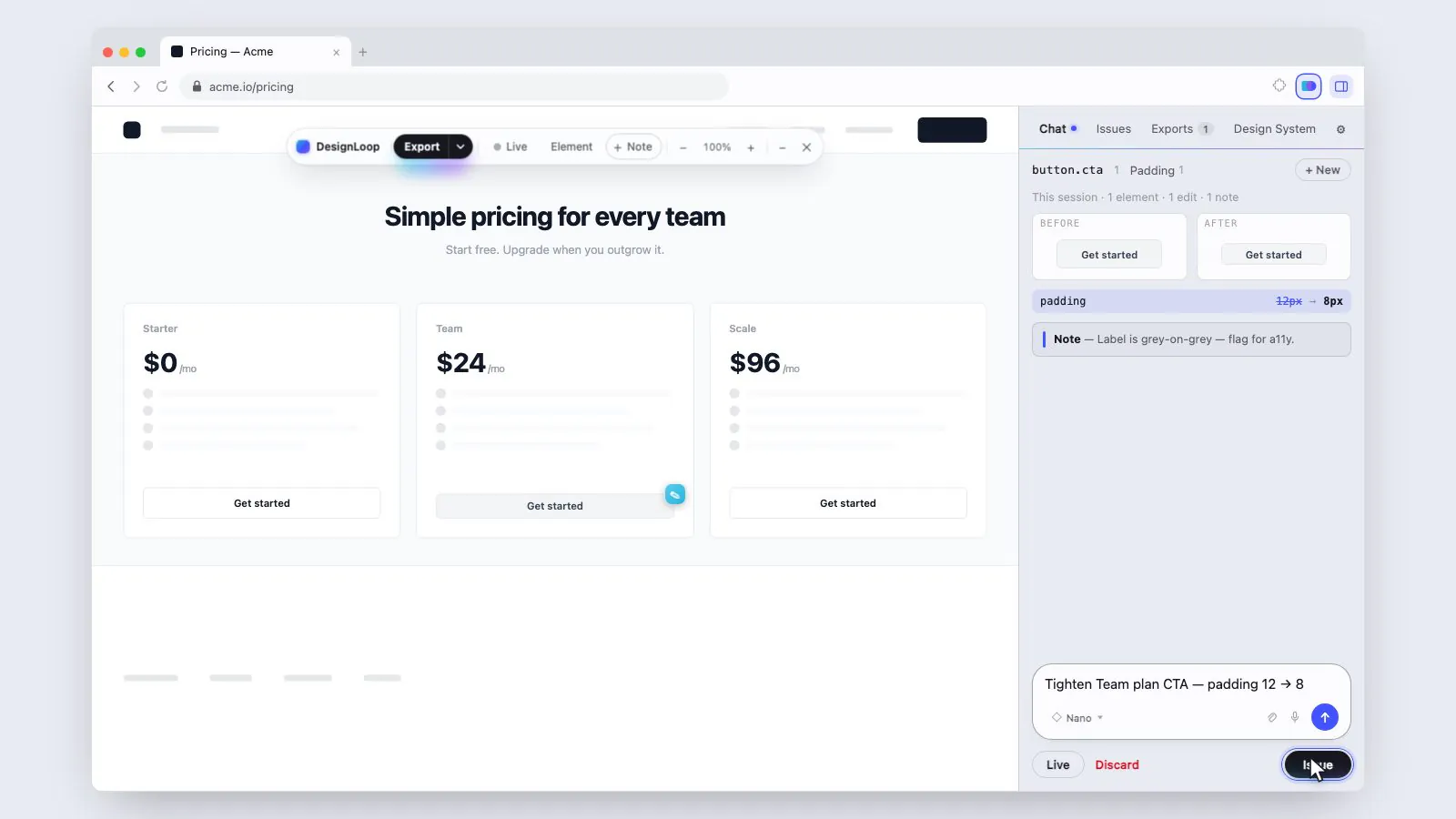
The in-page inspector open on a live element, padding going from 12px to 8px.
04
Hand it back to code
The session becomes one GitHub issue: before and after, the pixel-level
style diff, the selector, the component name, any console errors —
plus a block a coding agent can read. Or tag @claude on the
issue and let it open the PR.
The generated GitHub issue: before/after images and the pixel-level style diff.
04 → 01 The PR merges, the page ships,
someone looks at it again. That's the loop.
03 — The tour
Every screen, and what it's for
A side panel with four tabs, a toolbar that lives on the page itself, a
settings page, and a small Figma plugin. That's the whole app.
Side panel · Chat
Say what's wrong. Watch it change.
Type or talk. Point at one element or let it sweep the whole page.
Three ways to run it: Ask shows you each change and you
keep or revert it, Auto just applies, Plan
writes the change down first and touches nothing until you say go.
Every turn can be undone, rewound, retried, or edited and re-run.
A chat turn with its diff — padding: 12px → 8px — and Keep / Revert.
Side panel · Chat
Three engines, one of them free
Nano is Chrome's on-device model: private, free, one
element at a time. Plus and Pro run in
the cloud on your own OpenRouter key — they see the whole page,
take reference images, and do multi-pass work. Switch rungs mid-chat;
nothing here is locked behind an account of ours. (A hosted tier, with
our models and our storage, is coming for people who would rather not
bring a key at all — see below.)
The model picker: Nano / Plus / Pro, with the on-device rung showing "private".
Side panel · Design System
The system your page already has
Land on any page and it scans itself: colours, type, fonts, spacing,
radii, shadows, borders, and the components that repeat. Click a token to
see every element using it. Change a colour and the page recolours live.
Rename a font and it swaps, fetching from Google Fonts if it has to.
Then snap the page to the tokens — one pass, fully
reversible, line by line.
The board — swatches, type scale, spacing — beside the run ledger of applied and reverted ops.
Side panel · Exports
Four ways out
Full fidelity to the Figma plugin. Or the plugin
plus a skeleton — the loading state, derived from the
real tree, so the bones line up with the component instead of being
guessed by hand. Or SVG, which needs no plugin at all.
Or PNG. Capture at 1440, 834 and 390 in one bundle, and
the layers arrive named, not Frame 218.
The copy menu open on the four formats, with the viewport presets ticked.
Side panel · Issues
The write-up, done for you
Each draft carries the screenshot, the pixel-level style diff, the
selector, the element path, and the console errors. Scribble a box or an
arrow on the screenshot. Edit the title. Push one, or push all of them.
Then hand it to @claude, @codex or
@cursor — or to nobody, and do it yourself.
A draft with its style ledger, and the annotator drawing an arrow on the screenshot.
On the page
A toolbar that follows the work
Nothing is injected until you activate it. Then you get a small
draggable bar: export, go live, pick an element, leave a note, undo,
redo, zoom. Open the inspector dock and you have Figma's properties
panel on a real website — layers tree included — except the edits are
real, diffed, and undoable. Leave notes on elements and they ride along
into the issue.
The inspector dock open on a live site, with a note pin threaded on an element.
Figma · DesignLoop Import
Paste, and it's layers
Copy in the panel, paste in the plugin. Auto-layout where it's really
there, pixel-exact absolute where it isn't. Figma styles for colours and
text if you want them. If a font isn't installed, the import report says
so and gives you a dropdown to pick the one you do have — then re-imports
with your choice. It doesn't quietly fake it.
The import report: warnings, and a font-substitution dropdown before re-import.
Settings
Your keys, your repo, your agent
A GitHub token and a repo — that's the minimum. Optionally: an
OpenRouter key to unlock Plus and Pro, a voice provider, a language for
dictation, which coding agent to tag and how, a separate repo for
screenshots, and exactly what a capture is allowed to include. Delete
everything on the way out.
Settings: the GitHub token validating, and the coding-agent picker.
04 — The details
Built for the real page
On-device
Private AI, on your machine
The model is built into Chrome and runs on your device. No server, no
API key, nothing leaves your browser.
Voice
Talk to the page
Hover an element and say what's wrong. Voice drives both the restyling
and the bug report — and the transcript becomes the issue.
Fidelity
Real layers, honest limits
Gradients, shadows, per-character styling, rotation, auto-layout. Where
Figma can't represent something, the import report says so instead of
quietly faking it.
Fallback
No plugin? Still works
Copy any element as SVG and paste it straight into Figma as editable
vectors. The plugin buys you fidelity, not access.
05 — Privacy
There is no server
No backend, no analytics, no account. Nothing is injected into a page until
you activate it there. Out of the box the model is Chrome's, on your machine,
and nothing leaves the browser at all.
Turn on the cloud rungs and calls go straight from your browser to
OpenRouter, on your key — never through us, because there is no us to go
through. Your GitHub token never touches a page, and secrets are stripped out
of a capture before you even see the draft.
That is one of two ways to run this, and it is the way that exists today.
Living entirely in a browser tab buys you privacy and costs you nothing — but
it also caps what we can give you. Storage is whatever Chrome will hold. The
model is whatever you brought. And two people cannot work on the same session,
because a tab is a room with one chair in it.
So we are building a second option alongside it: a cloud tier, opt-in, for
people who want the reach. Real storage for your design systems and history
instead of what fits in local storage. Stronger models, so good work does not
depend on your own key. And collaboration — the one thing the browser genuinely
cannot do. Stay local if local is enough. Take the cloud when you want
more.